Database systems · Chapter 4 · Sections 4.8–4.13 · Introduction to SQL · Study guide
The second half of Chapter 4: how a query reaches across more than one table with a JOIN, how it collapses many rows into one summary line with an aggregate function and GROUP BY, and how one query can be nested inside another as a subquery. This continues directly from the Chapter 4 review for Sections 4.1–4.7, and uses the same PRODUCT and VENDOR tables, plus CUSTOMER, INVOICE, LINE, and EMP.
Get the database. Every worked example linked from this page runs against a small three table employee database: DEPARTMENT, JOBS, and EMPLOYEES. Download employee_db.py, save it in the same folder as your notebook, then run:
from employee_db import create_database connection, cursor = create_database()
That builds the tables and prints a short summary so you know it worked. Once ordinary joins, aggregates, and subqueries on EMPLOYEES feel comfortable, download employee_projects_db.py instead, in the same way with from employee_projects_db import create_database. It keeps DEPARTMENT, JOBS, and EMPLOYEES, and adds PROJECTS, an ASSIGNMENTS bridge table linking employees to projects many to many, and a PERFORMANCE_REVIEWS table, so you can practice bridge entity joins and subqueries the plain employee database is too small for.
Section 4.8
Every join reassembles data that normalization split across tables. What changes from one join type to the next is which unmatched rows, if any, survive.
A JOIN combines rows from two tables based on values found in a shared attribute. Splitting data into normalized tables removes redundancy, but a report almost always needs columns that now live in different tables; the join is what puts them back together at query time.
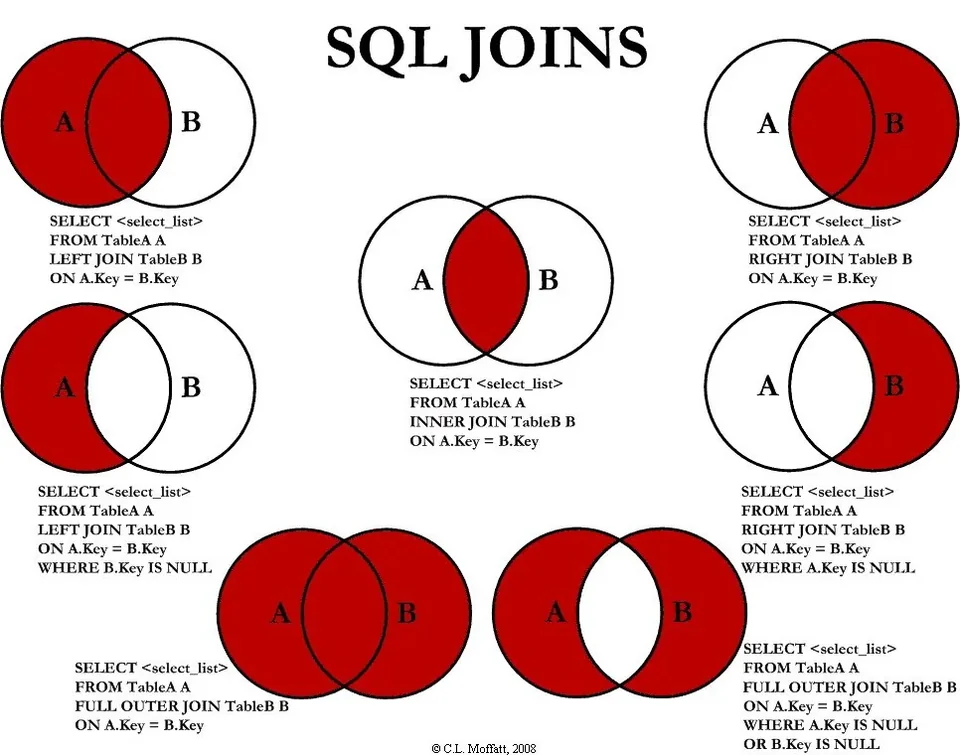
| Join | Definition |
|---|---|
| INNER JOIN | Only the rows where the join column matches in both tables. Rows with no match on either side are dropped entirely. |
| LEFT JOIN | Every row from TableA, matched to TableB where possible. A TableA row with no match still appears, with NULL in every TableB column. |
| RIGHT JOIN | Every row from TableB, matched to TableA where possible. A TableB row with no match still appears, with NULL in every TableA column. The mirror image of LEFT JOIN. |
| FULL OUTER JOIN | Every row from both tables. Matched rows are combined; unmatched rows from either side appear once, padded with NULL on the side that has no match. |
| LEFT JOIN … WHERE B.Key IS NULL | A LEFT JOIN with the matched rows thrown away afterward: only TableA rows that have no corresponding row in TableB. Answers "what's in A that isn't in B?" |
| RIGHT JOIN … WHERE A.Key IS NULL | The mirror image: only TableB rows that have no corresponding row in TableA. Answers "what's in B that isn't in A?" |
| FULL OUTER JOIN … WHERE A.Key IS NULL OR B.Key IS NULL | Rows that exist in exactly one of the two tables, never both: the two "exclusive" results above, combined into one result set. Sometimes called a full anti-join, or the symmetric difference of A and B. |
JOIN USING names the shared column once, in parentheses, and requires that the column have the same name in both tables.
SELECT INV_NUM, P_CODE, LINE_UNITS FROM INVOICE JOIN LINE USING (INV_NUM);
JOIN ON states the comparison in full, so the two columns being matched may have different names, and the condition can use any comparison operator, not only equals.
SELECT INVOICE.INV_NUM, P_CODE, LINE_UNITS
FROM INVOICE JOIN LINE
ON INVOICE.INV_NUM = LINE.INV_NUM;
| Form | Requires | Use when |
|---|---|---|
| JOIN USING | The join column has the identical name in both tables | The shortest way to write a common case |
| JOIN ON | Nothing beyond a valid comparison | The columns are named differently, or the match needs something other than equals |
You are forced into JOIN ON whenever the two join columns have different names. It is also the more flexible form in general, which is why most production SQL uses it even when USING would work.
A NATURAL JOIN matches automatically on every column that shares a name in both tables; no join condition is written at all.
SELECT INV_NUM, P_CODE, LINE_UNITS FROM INVOICE NATURAL JOIN LINE;
Its output differs from an ordinary equijoin in one visible way: the shared column appears once, not twice. Most practitioners still avoid it, because it guesses. If someone later adds a same-named column to both tables, for example a CREATED_DATE stamped on every row, the join silently starts matching on that column too and the result changes without any change to the SQL itself. A join written with ON states exactly what it matches on and keeps stating it.
A CROSS JOIN pairs every row of one table with every row of another, needing nothing in common between them. It is the SQL form of the PRODUCT operator from relational algebra.
SELECT C.CUS_CODE, V.V_NAME FROM CUSTOMER C CROSS JOIN VENDOR V;
It returns the row count of the first table multiplied by the row count of the second: 8 customers crossed with 7 vendors returns 56 rows; a 6 row table crossed with a 9 row table returns 54 rows, 6 times 9. Almost none of those pairings mean anything, which is why a cross join is rarely what you actually want. Its practical value is diagnostic: an inner join is really a cross join followed by a filter, so a query returning far more rows than either input table, with no obvious reason, is the signature of a forgotten join condition.
An OUTER JOIN keeps the matched rows plus the rows from one or both tables that have no partner, filling the missing side with NULL. An ordinary, or inner, join returns only rows with a match on both sides and silently drops the rest.
A LEFT OUTER JOIN keeps every row from the table written first. A RIGHT OUTER JOIN keeps every row from the table written second. Left and right describe nothing but the order the tables were typed in, so swapping the two table names turns one into the other.
SELECT C.CUS_CODE, C.CUS_LNAME, I.INV_NUM
FROM CUSTOMER C LEFT JOIN INVOICE I
ON C.CUS_CODE = I.CUS_CODE;
-- every customer appears, even one never invoiced; I.INV_NUM is NULL for those rows
The difference matters exactly when the absence of a match is the point of the report: customers who have never ordered, products that have never sold, employees with no assigned manager. An inner join would quietly return too few rows, or none, for every one of those questions.
Want more practice? See every one of these join types worked out again, from scratch, against an employee database in More JOIN examples: the employee database.
Section 4.9
Turning many rows into one summary number, one group at a time, and the fixed order SQL insists on doing that in.
An aggregate function reduces a whole column of values down to a single summary value. Chapter 4 covers five. COUNT returns the number of rows. SUM totals a numeric column. AVG returns the arithmetic mean. MIN returns the smallest value present. MAX returns the largest.
SELECT COUNT(*), COUNT(V_CODE), AVG(P_PRICE), MIN(P_PRICE), MAX(P_PRICE) FROM PRODUCT;
Nulls are ignored by every aggregate rather than treated as zero, which is why COUNT(*) and COUNT(V_CODE) can disagree on the very same table: COUNT(*) counts every row returned, no matter what is in it, while COUNT(V_CODE) counts only the rows where V_CODE is not null. Sixteen products, three with no vendor assigned, gives COUNT(*) of 16 and COUNT(V_CODE) of 13. The same rule quietly changes AVG too: it divides by the number of non-null values, not the number of rows, so two nulls in a ten-row column average over 8 values, not 10.
GROUP BY collects rows that share the same value into groups, so an aggregate function is applied separately to each group instead of to the whole table at once.
SELECT V_CODE, COUNT(*)
FROM PRODUCT
GROUP BY V_CODE;
-- one output row per vendor, including a group for products with no vendor
Every column named in the SELECT clause of a grouped query must either appear in the GROUP BY clause or sit inside an aggregate function. A grouped row collapses many source rows into one line of output; a column named in GROUP BY holds one shared value across that whole group, and a column inside an aggregate is reduced to one value by the function, so there is always something obvious to display. Any other column could hold several different values within one group, and the DBMS has no basis for picking one of them, so the query is rejected instead.
WHERE filters individual rows before grouping happens. HAVING filters whole groups after grouping has already happened. A query can use both, and each does a different job.
That order is exactly why an aggregate function cannot appear in a WHERE clause: at the moment WHERE runs, no groups exist yet, so there is nothing to count or total. WHERE COUNT(*) > 5 is rejected; HAVING COUNT(*) > 5 is the correct way to keep only the larger groups.
SELECT V_CODE, COUNT(*) AS PRODUCT_COUNT FROM PRODUCT WHERE V_CODE IS NOT NULL GROUP BY V_CODE HAVING COUNT(*) > 2 ORDER BY PRODUCT_COUNT DESC;
Read that query in the order it actually executes: WHERE removes the products with no vendor before anything is grouped; GROUP BY then collects what is left into one group per vendor; HAVING throws out the groups of two or fewer; only then does SELECT choose the columns and ORDER BY sort what remains. Every grouped query you write follows this same five-clause shape.
Want more practice? See COUNT, SUM, AVG, MIN, MAX, GROUP BY, and HAVING worked out again against payroll data in More aggregate function examples: the employee database.
Section 4.10
A query nested inside another query, written in parentheses, whose result the outer query then uses.
A subquery is a complete SELECT statement written inside another SELECT statement. It can appear in several places: in the WHERE clause it supplies a value or a list to compare against; in the FROM clause it acts as a temporary, unnamed table for the outer query to read from; in the SELECT clause it can supply one computed value per row.
SELECT P_CODE, P_PRICE FROM PRODUCT WHERE P_PRICE > (SELECT AVG(P_PRICE) FROM PRODUCT);
An ordinary subquery like this one runs once. The DBMS evaluates the inner SELECT first, gets back a single answer, in this case the average price, and then compares every row of the outer query against that one fixed number.
Section 4.11
A subquery that looks back at the row the outer query is currently on, and the operator that only cares whether a subquery found anything at all.
A correlated subquery is one that references a column belonging to the outer query. That back-reference is what makes it correlated, and it also changes how often the inner query has to run: since its answer depends on the current outer row, it must execute once per row the outer query examines, rather than a single time.
SELECT P_CODE, P_QOH FROM PRODUCT P WHERE P_QOH > (SELECT AVG(P_QOH) FROM PRODUCT WHERE V_CODE = P.V_CODE);
The P.V_CODE inside the inner query points back at the outer table's current row, so the average recomputes for every product against that product's own vendor. Delete the reference and it becomes an ordinary, single-run subquery instead. Because it reruns per row, a correlated subquery is more expensive than an ordinary one.
EXISTS returns true the moment the query following it returns at least one row; it never looks at what is in those rows, only whether any came back. EXISTS is most often paired with a correlated subquery, since the question "does anything match this particular row?" needs the inner query to look back at the outer row to mean anything.
SELECT P_CODE, P_DESCRIPT FROM PRODUCT P WHERE EXISTS (SELECT * FROM LINE L WHERE L.P_CODE = P.P_CODE); -- every product that has sold at least once SELECT P_CODE, P_DESCRIPT FROM PRODUCT P WHERE NOT EXISTS (SELECT * FROM LINE L WHERE L.P_CODE = P.P_CODE); -- every product that has never sold
L.P_CODE = P.P_CODE is what correlates the inner query to the outer one. Without it, EXISTS would just ask once whether LINE has any rows at all, which is a very different, and far less useful, question.
Want more practice? See ordinary subqueries, correlated subqueries, EXISTS, and subqueries in FROM and SELECT worked out again against an employee database in More subquery examples: the employee database.
Section 4.12
Joining a table to itself, so a row can point at another row in the very same table.
A recursive query joins a table to itself. It is how you read a table that stores a recursive relationship: one row referencing another row of that same table, such as an EMP table where the column EMP_MGR holds the employee number of that employee's own manager. The table is listed twice in the FROM clause, each copy given a different alias so the two roles can be told apart.
SELECT E.EMP_NUM, E.EMP_LNAME, M.EMP_LNAME AS MANAGER
FROM EMP E JOIN EMP M
ON E.EMP_MGR = M.EMP_NUM;
Here E stands for the employee and M for that employee's manager, even though both aliases point at the identical EMP table. An employee at the top of the hierarchy, with no manager, has a null EMP_MGR and is dropped by this inner join; keeping that top employee in the result would need a LEFT JOIN instead, for the same reason a left join keeps any other row with no match.
Section 4.13
A single query that leans on a join, a group, and a filter on the group, all at once, plus a checklist for building your own from scratch.
A real report usually needs more than one of these tools together. Suppose the question is: which vendors supply more than one product priced over $50? That needs a join to bring in the vendor's name, a WHERE to keep only the expensive products, a GROUP BY to collect the surviving products by vendor, and a HAVING to keep only the vendors with more than one.
SELECT V.V_NAME, COUNT(*) AS EXPENSIVE_PRODUCTS
FROM VENDOR V JOIN PRODUCT P
ON V.V_CODE = P.V_CODE
WHERE P.P_PRICE > 50
GROUP BY V.V_NAME
HAVING COUNT(*) > 1
ORDER BY EXPENSIVE_PRODUCTS DESC;
Read it in execution order, not the order it is typed: the join happens first and builds the combined rows; WHERE removes the cheap products from that combined set; GROUP BY collects what survives by vendor name; HAVING drops the vendors left with only one qualifying product; SELECT and ORDER BY only then choose and sort the final output.
| Ask | Points you to |
|---|---|
| Do I need columns from more than one table? | A JOIN, and the right kind: inner if unmatched rows should vanish, outer if they should be kept |
| Do I need one number per group, not per row? | An aggregate function plus GROUP BY |
| Am I filtering individual rows, or filtering the finished groups? | WHERE for rows, HAVING for groups |
| Does my condition depend on comparing against a computed value? | A subquery; correlated if that value must be recomputed per outer row |
| Does a row in this table reference another row of the same table? | A recursive query, the table joined to itself with two aliases |